SQL : PostgreSQL

  Aggregate Functions Like most other relational database products,  PostgreSQL  supports  aggregate functions . An aggregate function computes a single result from multiple input rows. For example, there are aggregates to compute the  count ,  sum ,  avg  (average),  max  (maximum) and  min  (minimum) over a set of rows. As an example, we can find the highest low-temperature reading anywhere with: SELECT max(temp_lo) FROM weather; max ----- 46 (1 row) If we wanted to know what city (or cities) that reading occurred in, we might try: SELECT city FROM weather WHERE temp_lo = max(temp_lo); WRONG but this will not work since the aggregate  max  cannot be used in the  WHERE  clause. (This restriction exists because the  WHERE  clause determines which rows will be included in the aggregate calculation; so obviously it has to be evaluated before aggregate functions are computed.) However, as is o...

SQL "scratch- to- pro"


https://www.youtube.com/watch?v=KG-mqHoXOXY History of SQL

Rule of CODD's https://www.w3resource.com/sql/sql-basic/codd-12-rule-relation.php

Using SQL as a junior data analyst

In this reading, you will learn more about how to decide when to use SQL, or Structured Query Language. As a data analyst, you will be tasked with handling a lot of data, and SQL is one of the tools that can help make your work a lot easier. SQL is the primary way data analysts extract data from databases. As a data analyst, you will work with databases all the time, which is why SQL is such a key skill. Let’s follow along as a junior data analyst uses SQL to solve a business task.  

The business task and context

The junior data analyst in this example works for a social media company. A new business model was implemented on February 15, 2020 and the company wants to understand how their user-growth compares to the previous year. Specifically, the data analyst was asked to find out how many users have joined since February 15, 2020. 

An image of a person holding a laptop containing different data and an image of a multi-colored outline of 3 people

Spreadsheets functions and formulas or SQL queries?

Before they can address this question, this data analyst needs to choose what tool to use. First, they have to think about where the data lives. If it is stored in a database, then SQL is the best tool for the job. But if it is stored in a spreadsheet, then they will have to perform their analysis in that spreadsheet. In that scenario, they could create a pivot table of the data and then apply specific formulas and filters to their data until they were given the number of users that joined after February 15th. It isn’t a really complicated process, but it would involve a lot of steps. 

In this case, the data is stored in a database, so they will have to work with SQL. And this data analyst knows they could get the same results with a single SQL query:

Screenshot of a single SQL query

Spreadsheets and SQL both have their advantages and disadvantages:

Features of Spreadsheets

Features of SQL Databases 

Smaller data sets

Larger datasets

Enter data manually

Access tables across a database

Create graphs and visualizations in the same program

Prepare data for further analysis in another software

Built-in spell check and other useful functions

Fast and powerful functionality

Best when working solo on a project

Great for collaborative work and tracking queries run by all users

When it comes down to it, where the data lives will decide which tool you use. If you are working with data that is already in a spreadsheet, that is most likely where you will perform your analysis. And if you are working with data stored in a database, SQL will be the best tool for you to use for your analysis. You will learn more about SQL coming up, so that you will be ready to tackle any business problem with the best tool possible. 

SQL dialects and their uses

In this reading, you will learn more about SQL dialects and some of their different uses. As a quick refresher, Structured Query Language, or SQL, is a language used to talk to databases. Learning SQL can be a lot like learning a new language — including the fact that languages usually have different dialects within them. Some database products have their own variant of SQL, and these different varieties of SQL dialects are what help you communicate with each database product.

These dialects will be different from company to company and might change over time if the company moves to another database system. So, a lot of analysts start with Standard SQL and then adjust the dialect they use based on what database they are working with. Standard SQL works with a majority of databases and requires a small number of syntax changes to adapt to other dialects.

As a junior data analyst, it is important to know that there are slight differences between dialects. But by mastering Standard SQL, which is the dialect you will be working with in this program, you will be prepared to use SQL in any database. 

More information

You may not need to know every SQL dialect, but it is useful to know that these different dialects exist. If you are interested in learning more about SQL dialects and when they are used, you can check out these resources for more information:

ntroduction to SQL language

SQL is a programming language designed to manage data stored in a relational database management system (RDBMS).

SQL stands for the structured query language. It is pronounced as /ˈɛs kjuː ˈɛl/ or /ˈsiːkwəl/.

SQL consists of a data definition language, data manipulation language, and a data control language.

  • The data definition language deals with the schema creation and modification e.g., CREATE TABLE statement allows you to create a new table in the database and the ALTER TABLE statement changes the structure of an existing table.
  • The data manipulation language provides the constructs to query data such as the SELECT statement and to update the data such as INSERTUPDATE, and DELETE statements.
  • The data control language consists of the statements that deal with the user authorization and security such as GRANT and REVOKE statements.

SQL Standard

SQL was one of the first commercial database languages since 1970. Since then different database vendors implemented SQL in their products with some variations. To bring greater conformity between the vendors, the American Standards Institute (ANSI) published the first SQL standard in 1986.

ANSI then updated the SQL standard in 1992, known as SQL92 and SQL2, and again in 1999 as SQL99 and SQL3. Every time, ANSI added new features and commands into the SQL language.

The SQL Standard is now maintained by both ANSI and international Standards Organization as ISO/IEC 9075 standard. The latest release standard is SQL:2011.

The SQL standard formalizes SQL syntax structures and behaviors across database products. It becomes even more important to the open source databases such as MySQL and PostgreSQL where the RDBMS are developed mainly by the communities rather than big corporations.

SQL Dialects

The community constantly requests for the new features and capabilities that do not exist in the SQL standard yet, therefore, even with the SQL standard in place, there are many SQL dialects in various database products.

Because ANSI and ISO have not yet developed these important features, RDBMS vendors (or communities) are free to invent their own new syntax structure.

The following are the most popular dialects of SQL:

In each tutorial, we will explain the SQL syntax structures and behaviors that are valid across the databases. We also will discuss the exceptions if they exist in a particular database.


SQL, or Structured Query Language, is the standard language for interacting with relational databases. With SQL, you can query, or ask questions of, the data in a relational database. Working with SQL and relational databases is an invaluable skill set for a data analyst, data engineer, or a data scientist.

If you have started looking for ways to learn SQL, you may have noticed the many different dialects of SQL available to learn with some clear (and less clear) distinctions between the different dialects. So where do you begin? Which version of SQL is most helpful to you if you haven’t used it before? In this article, we will focus on four of the most popular database management systems -- PostgreSQL, MySQL, SQLite, and SQL Server -- and their versions of SQL syntax.

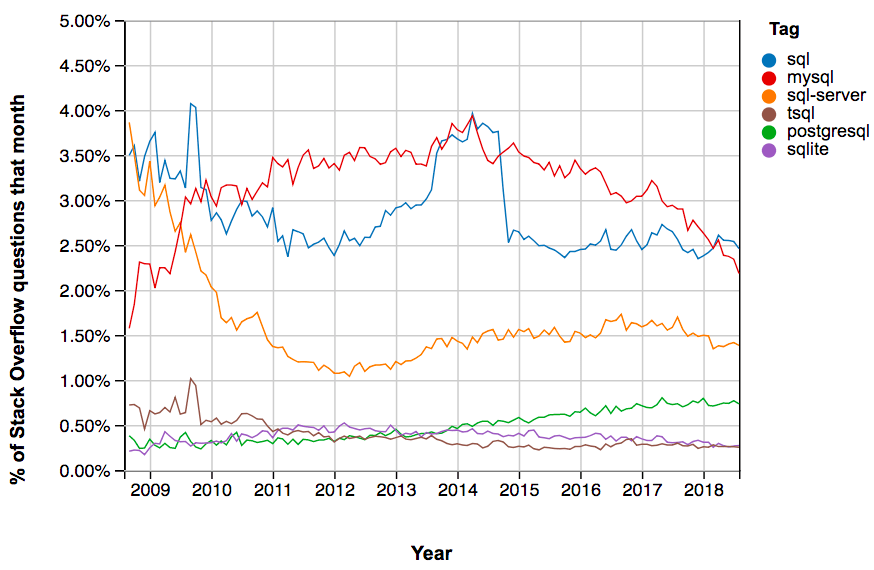
The graph below from Stack Overflow Trends provides a sense of how often each of these platforms is discussed -- each line represents the percentage of all Stack Overflow questions about each version of SQL.

MySQL has consistently been the most popular version of SQL in Stack Overflow questions. Second in line is Microsoft SQL Server (including T-SQL, the name of Microsoft’s dialect of SQL), which remains a consistently more popular tag than PostgreSQL and SQLite. This means that if you have a question specific to one of these systems, you’re more likely to find that someone already asked your question.

What’s the difference?

PostgreSQL, MySQL, and SQLite use very similar syntax, with some notable differences highlighted below. Microsoft SQL Server has the greatest contrast in SQL syntax, as well as a wide variety of functions not available in other platforms. The table below highlights some examples of basic differences between SQL platforms.

SQL ServerMySQLPostgreSQLSQLite
SELECT ...Select [col1], [col2]SELECT col1, col2SELECT col1, col2SELECT col1, col2
Data from tables is case sensitive?Yes WHERE name = ‘John’ Or WHERE name = ‘john’ are not the sameNo WHERE name = ‘John’ Or WHERE name = ‘john’ are the sameYes WHERE name = ‘John’ Or WHERE name = ‘john’ are not the sameYes WHERE name = ‘John’ Or WHERE name = ‘john’ are not the same
Using quotation marksname = ‘John’ onlyname = ‘John’ or name = “John”name = ‘John’ onlyname = ‘John’ or name = “John”
Aliases for columns and tablesSELECT AVG(col1)=avg1SELECT AVG(col1) AS avg1SELECT AVG(col1) AS avg1SELECT AVG(col1) AS avg1
Working with datesGETDATE() DATEPART()CURDATE() CURTIME() EXTRACT()CURRENT_DATE() CURRENT_TIME() EXTRACT()DATE(‘now’) strftime()
Window functions i.e., OVER(), PARTITION BY()YesYesYesNo (need to use subqueries instead)

Where do I start?

For students who have little to no experience with SQL and are looking to gain the most broadly applicable skills, I recommend starting with PostgreSQL. Despite the overwhelming popularity of MySQL, PostgreSQL may be a better choice because its syntax most closely conforms to Standard SQL. This means that you can easily translate your skills to other database management systems such as MySQL or SQLite. For example, the query below aggregates data from a database of sales information. It contains a join, an aggregate function, and a filter. This syntax will generate identical results in all three database systems.

Select    
    c.customer_name,
    SUM(p.amount) AS total_sales
FROM customers AS c
    LEFT JOIN purchases AS p
    ON c.customers_id = p.customer_id
WHERE
    c.customer_location = 'USA'
GROUP BY
    c.customer_name;

If you anticipate working with Microsoft SQL Server in your career, I recommend you start by learning T-SQL/Microsoft SQL. SQL Server continues to maintain a sizable market share and is an important database management system in many industries. If you are unsure which of these two is more important for you, I recommend browsing through job openings in your field to determine if there is a preference for a specific database system in specific roles or industries.

How can DataCamp help?

At DataCamp, we currently offer two courses in SQL that cover introductory topics and joins in PostgreSQL. We have some exciting courses in development covering intermediate and advanced topics in PostgreSQL. We also have several SQL Server courses in development, including an Introduction to T-SQL/Microsoft SQL course that will provide you with a clear foundation for working with SQL Server. You can check out our course roadmap for more information.

If you’re looking to practice interacting with a PostgreSQL database on your own, I recommend exploring data sets on Kaggle. If you find something that interests you, go ahead and import into PostgreSQL (CSV or SQLite files will import into PostgreSQL) and start exploring!

Difference Between SQL and MySQL in Table Format

SQLMySQL
SQL is Structured Query Language used to manage the relational databases.MySQL is a relational database management system used to store, retrieve, modify and administer a database using SQL. We have a lot of database software available in the market. The popular ones include MySQL, SQL Server, Oracle, Informix, etc.
It’s a query language.It’s database software. It uses SQL as a language to query the database.
Since this is a language, it does not get updates. SQL commands always remain the same.


SQL ServerMySQL
WebsiteSQL ServerMySQL
LicensingIt is proprietary software.It is free and open source under GPL v2 license, as well as distributed as proprietary software.
DeveloperIt is developed by Microsoft.
Since SQL server is designed by Microsoft, it is also often called as MS SQL Server.
It is developed by Oracle Corporation.
Written inIt is written in c and C++It is also written in C and C++.
Supported PlatformsSupports Linux, Mac OS X, Microsoft Windows Server, and Microsoft Windows operating systems. It was originally developed for Windows exclusively. However, it is also available on Linux and Mac OSX via docker. But, SQL server on Linux or Mac OS X will definitely lack certain features.Smooth Support for Linux, Solaris, Windows, macOS and FreeBSD operating systems. Runs nearly on every popular OS.
Supported Programming LanguagesSupports multiple programming languages including Java, PHP, VB, Delphi, Go, Python, Ruby, C++, and R.It supports all programming languages supported by SQL Server. Furthermore, MySQL supports some additional languages including Perl, Scheme, Eiffel, Tcl, and Haskel. This makes MySQL very popular among developer communities.
SyntaxSQL server syntax is simple and easy to use.It is observed that MySQL syntax is a bit complex.
MultilingualAvailable in multiple languagesAvailable only in English language.
Storage EngineSingle storage Engine which is its native engine.Multiple storage Engine support. Also has an option for using a plug-in storage engine.
FilteringSupports row-based filtering which filters out the records on a database by database way. Gives the advantage of filtering multiple rows without considering a number of databases. Moreover, the filtered data is kept in a separate distribution database.Allows to filter out the tables, rows, and users in a variety of ways. However, MySQL supports filtering only on individual database basis. So, developers have to filter database tables individually by executing multiple queries.
BackupIn SQL Server, while backing up the data, the database is not blocked. This allows users to complete the backup and data restoration process completed in less time and efforts.Backup of the data can be taken by extricating all the data as SQL statements. During the backup process, the database is blocked. This prevents the instances of data corruption while migrating from one version of MySQL to another. However, increases the total time and efforts in the data restoration process because of running multiple SQL statements.
Option to stop Query ExecutionCan truncate the query execution without killing the whole process. It utilizes a transactional engine to hold the state consistent.Can’t cancel or kill the query execution without killing the entire process
SecurityBoth SQL Server and MySQL are built as binary collections. However, SQL server is more secure than MySQL. It does not let any process to access and manipulate the database files at run time. Users need to perform specific functions or manipulate files by executing an instance. This prevents hackers to access or manipulate the data directly.It allows developers to manipulate database files through binaries at the run time. It also allows other processes to access and manipulate the database files at the run time.
EditionsMicrosoft offers different editions of SQL Server 2017- Enterprise, Standard, Web, Express and Developer Editions. Each of these editions varies in terms of their features and purposes.Depending upon different business and technical needs, MySQL offers three different editions – MySQL standard edition, MySQL Enterprise Edition, and MySQL Cluster CGE. There is also a community edition of MySQL which is open source and free.
PricingThe developer edition and express edition of SQL Server 2017 are free of cost. Enterprise edition costs $14,256 per core. Standard – per core edition is priced at $3,717, Standard – Server + CAL costs $931. For the Web edition price, you need to contact your hosting partner.The standard edition annual subscription is USD 2,000; Enterprise edition costs USD 5,000 and cluster CGE edition costs $ 10,000.

Difference Between SQL and MySQL Commands

Under this topic, we will be discussing the differences between MS SQL Server commands and MySQL commands. There are some variations in the commonly used SQL code in both of these relational database management systems.

FactorsMS SQL ServerMySQL
Length functionSELECT LEN(data_string) FROM TableNameSELECT CHARACTER_LENGTH(data_string) FROM TableName
Concatenation functionSELECT (‘SQL’ + ‘SERVER’)SELECT CONCAT (‘My’, ‘SQL’)
Select top n records from a tableSELECT TOP 10 * FROM TableName WHERE id = 2SELECT * FROM TableName WHERE id = 2 LIMIT 10
Generate GUID (Global Unique Identifier)SELECT NEWID()SELECT UUID()
Get current date and timeSELECT GETDATE()SELECT NOW()
Case Sensitive Collation
In SQL Server, if the database is defined with case sensitive collation then the table names and column names become case sensitive.

Let us take an example here.
Suppose you have created a table in a case sensitive collation database :

Create table Engineers(SNo int, EngineerName Varchar(80), Salary money)
Observe the capital E in the table name.

Now if I run the following query:
Select * from engineers

Then it will give the following error:
Invalid object name ‘engineers’

You need to write the table name in the query in the same case as it was mentioned at the time of table creation:
Select * from Engineers
In MySQL, there is no case sensitiveness in identifier names.

MySQL vs SQL Server Performance

For high-end applications, both MYSQL and SQL Server offer a similar level of speed and performance. Both have the capacity to host several databases on one server. They make use of indexes to sort data and accelerate performance.

A few years ago, IJARCCE (International Journal of Advanced Research in Computer and Communication Engineering) published a comparative performance analysis done between MySQL and SQL Server.

Different SELECT, INSERT, DELETE and UPDATE queries were executed on both the RDBMS on Windows system and their execution time was recorded. It was concluded that SQL Server offers better performance than MySQL in terms of response time. Except for the INSERT queries, SQL Server consistently took lesser time for all the other test cases as against MySQL.

In terms of scaling up, MySQL showed two times increase in time when the number of rows went up. SQL Server also showed an increase in time, but it was not as much as MySQL. Thus, SQL Server scales better than MySQL.

The most significant difference between the two was seen in terms of SELECT statements. For 3000 rows SELECT statement, MySQL took almost 3 times of the time taken by the SQL Server.

You can have a look at the below comparison charts:

Averages for a non-conditional SELECT query

1.Averages for a non-conditional SELECT query1

Averages for SELECT query having an ORDER clause on a non-indexed field

2.Averages for SELECT query having an ORDER clause on a non-indexed field

Averages for SELECT query with a JOIN

3.Averages for SELECT query with a JOIN1

Averages for SELECT query having a JOIN and an ORDER clause on a non-indexed field

4.Averages for SELECT query having a JOIN and an ORDER clause on a non-indexed field

Averages for 100 INSERT queries

5.Averages for 100 INSERT queries

Averages for conditional DELETE query

6.Averages for conditional DELETE query

Averages for non-conditional DELETE query

7.Averages for non-conditional DELETE query

Averages for conditional UPDATE query

8.Averages for conditional UPDATE query

Averages for non-conditional UPDATE query

9.Averages for non-conditional UPDATE query

[image source]

Which is Better – MySQL or SQL Server?

While thinking about which one is better out of MySQL and Microsoft SQL Server, it will depend upon your use cases, budget and perspective. Both are effective in organizing your data and they make it readily accessible through a user interface.

Both the technologies work on the concept of storing data as per schema (table storage). MySQL is inclined more towards selecting the data to facilitate data display, update and save the data again. It is a bit weaker than SQL Server in terms of data insertion and deletion.

However, it’s a great choice for data storage and referencing data. Also, MySQL is not so much rich in terms of development functions and capabilities.

Talking about the security features, both the technologies are EC2 complaint. But, Microsoft SQL server has an edge in offering overall security features. In SQL Server, there is a tool called Baseline Security analyzer that aids administrators to make sure that SQL server installation is up to date. In MySQL, there is no such security analyzer.

Considering the support, the respective vendors for both the systems provide support in paid as well as free form. As MYSQL is now owned by Oracle, it offers support through technical assistance and Virtual MySQL DBA assistant.

Then again, Microsoft provides solid assistance over its SQL database and cloud storage. It offers a free assistant called SSMA (SQL Server Migration Assistant) which makes it simple and easy to migrate the data from other DBMS like Oracle, MySQL, Microsoft Access and Sybase to SQL Server.

Moreover, MS SQL Server offers ETL functionality which is not there in MySQL. Overall, as per my perspective, SQL server is better than MySQL, but it is more expensive because of its amazing features.

If you are a large enterprise with massive data and concerned about speed, security and power, and most importantly if you have enough budget, then I would suggest going with SQL Server. For individual users and small to medium-sized companies where the amount of data and work required is not that massive, you can go with MySQL.

Again, Microsoft offers SQL server express to cater to the needs of a small organization. The express edition is also free. Thus, SQL server can serve all type of needs. But, MySQL can handle only up to medium level enterprise and where you need to optimize expenditure.

Hence, the choice will depend upon your requirements.


What is the difference between SQL and MS SQL?

Answer: The main difference between SQL and MS SQL is that SQL is a query language that is used in relation databases whereas MS SQL Server is itself a relational database management system (RDBMS) developed by Microsoft.

A query language is basically used for retrieval and modification of information stored in databases. A DBMS is a software that is used to manage the database.

Basically, it’s a collection of programs, features, and capabilities that allow you to interact with the database so as to perform tasks related to data definition, data updating, data retrieval, and user administration. A RDBMS is a database management system with row-based table structure.

Most of the commercial RDBMS use SQL to interact with the database.


Basic syntax for aliasing

Aliasing is the process of using aliases. In SQL queries, aliases are implemented by making use of the AS command. The basic syntax for the AS command can be seen in the following query for aliasing a table:

Notice that AS is preceded by the table name and followed by the new nickname. It is a similar approach to aliasing a column:

In both cases, you now have a new name that you can use to refer to the column or table that was aliased.

Alternate syntax for aliases

If using AS results in an error when running a query because the SQL database you are working with doesn't support it, you can leave it out. In the previous examples, the alternate syntax for aliasing a table or column would be:

  • FROM table_name alias_name
  • SELECT column_name alias_name

The key takeaway is that queries can run with or without using AS for aliasing, but using AS has the benefit of making queries more readable. It helps to make aliases stand out more clearly.

Aliasing in action

Let’s check out an example of a SQL query that uses aliasing. Let’s say that you are working with two tables: one of them has employee data and the other one has department data. The FROM statement to alias those tables could be:

These aliases still let you know exactly what is in these tables, but now you don’t have to manually input those long table names. Aliases can be really helpful for long, complicated queries. It is easier to read and write your queries when you have aliases that tell you what is included within your tables.

For more information

If you are interested in learning more about aliasing, here are some resources to help you get started:

  • SQL Aliases: This tutorial on aliasing is a really useful resource to have when you start practicing writing queries and aliasing tables on your own. It also demonstrates how aliasing works with real tables. 
  • SQL Alias: This detailed introduction to aliasing includes multiple examples. This is another great resource to reference if you need more examples. 
  • Using Column Aliasing: This is a guide that focuses on column aliasing specifically. Generally, you will be aliasing entire tables, but if you find yourself needing to alias just a column, this is a great resource to have bookmarked.  

  • The general JOIN syntax

    As you can see from the syntax, the JOIN statement is part of the FROM clause of the query. JOIN in SQL indicates that you are going to combine data from two tables. ON in SQL identifies how the tables are to be matched for the correct information to be combined from both.

    Type of JOINs

    There are four general ways in which to conduct JOINs in SQL queries: INNER, LEFT, RIGHT, and FULL OUTER.

    Here is what these different JOIN queries do.

    INNER JOIN

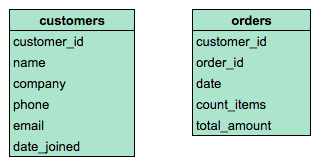
    INNER is optional in this SQL query because it is the default as well as the most commonly used JOIN operation. You may see this as JOIN only. INNER JOIN returns records if the data lives in both tables. For example, if you use INNER JOIN for the 'customers' and 'orders' tables and match the data using the customer_id key, you would combine the data for each customer_id that exists in both tables. If a customer_id exists in the customers table but not the orders table, data for that customer_id isn’t joined or returned by the query.

    The results from the query might look like the following, where customer_name is from the customers table and product_id and ship_date are from the orders table:

    customer_nameproduct_idship_date
    Martin's Ice Cream0439982021-02-23
    Beachside Treats8720122021-02-25
    Mona's Natural Flavors7249562021-02-28
    ... etc.... etc.... etc.

    The data from both tables was joined together by matching the customer_id common to both tables. Notice that customer_id doesn’t show up in the query results. It is simply used to establish the relationship between the data in the two tables so the data can be joined and returned.

    LEFT JOIN

    You may see this as LEFT OUTER JOIN, but most users prefer LEFT JOIN. Both are correct syntax. LEFT JOIN returns all the records from the left table and only the matching records from the right table. Use LEFT JOIN whenever you need the data from the entire first table and values from the second table, if they exist. For example, in the query below, LEFT JOIN will return customer_name with the corresponding sales_rep, if it is available. If there is a customer who did not interact with a sales representative, that customer would still show up in the query results but with a NULL value for sales_rep.

    The results from the query might look like the following where customer_name is from the customers table and sales_rep is from the sales table. Again, the data from both tables was joined together by matching the customer_id common to both tables even though customer_id wasn't returned in the query results.

    customer_namesales_rep
    Martin's Ice CreamLuis Reyes
    Beachside TreatsNULL
    Mona's Natural FlavorsGeri Hall
    ...etc....etc.

    RIGHT JOIN

    You may see this as RIGHT OUTER JOIN or RIGHT JOIN. RIGHT JOIN returns all records from the right table and the corresponding records from the left table. Practically speaking, RIGHT JOIN is rarely used. Most people simply switch the tables and stick with LEFT JOIN. But using the previous example for LEFT JOIN, the query using RIGHT JOIN would look like the following:

    The query results are the same as the previous LEFT JOIN example.

    customer_namesales_rep
    Martin's Ice CreamLuis Reyes
    Beachside TreatsNULL
    Mona's Natural FlavorsGeri Hall
    ...etc. ...etc.

    FULL OUTER JOIN

    You may sometimes see this as FULL JOIN. FULL OUTER JOIN returns all records from the specified tables. You can combine tables this way, but remember that this can potentially be a large data pull as a result. FULL OUTER JOIN returns all records from both tables even if data isn’t populated in one of the tables. For example, in the query below, you will get all customers and their products’ shipping dates. Because you are using a FULL OUTER JOIN, you may get customers returned without corresponding shipping dates or shipping dates without corresponding customers. A NULL value is returned if corresponding data doesn’t exist in either table.

    The results from the query might look like the following.

    customer_nameship_date
    Martin's Ice Cream2021-02-23
    Beachside Treats2021-02-25
    NULL2021-02-25
    The Daily ScoopNULL
    Mountain Ice CreamNULL
    Mona's Natural Flavors2021-02-28
    ...etc....etc.

    For more information

    JOINs are going to be useful for working with relational databases and SQL—and you will have plenty of opportunities to practice them on your own. Here are a few other resources that can give you more information about JOINs and how to use them:

    • SQL JOINsThis is a good basic explanation of JOINs with examples. If you need a quick reminder of what the different JOINs do, this is a great resource to bookmark and come back to later.  
    • Database JOINs - Introduction to JOIN Types and ConceptsThis is a really thorough introduction to JOINs. Not only does this article explain what JOINs are and how to use them, but it also explains the various scenarios in more detail of when and why you would use the different JOINs. This is a great resource if you are interested in learning more about the logic behind JOINing.
    • SQL JOIN Types Explained in Visuals: This resource has a visual representation of the different JOINs. This is a really useful way to think about JOINs if you are a visual learner, and it can be a really useful way to remember the different JOINs. 
    • SQL JOINs: Bringing Data Together One Join at a TimeNot only does this resource have a detailed explanation of JOINs with examples, but it also provides example data that you can use to follow along with their step-by-step guide. This is a useful way to practice JOINs with some real data. 
    • SQL JOIN: This is another resource that provides a clear explanation of JOINs and uses examples to demonstrate how they work. The examples also combine JOINs with aliasing. This is a great opportunity to see how JOINs can be combined with other SQL concepts that you have been learning about in this course.  

Since it’s a software, it gets frequent updates.


Comments

Popular posts from this blog

SQL : PostgreSQL

Using BigQuery / MySQL / other SQL

The R-versus-Python debate